Tesla Reality View Turns FSD v15 Trips Into Something That Looks Just Like GTA 6
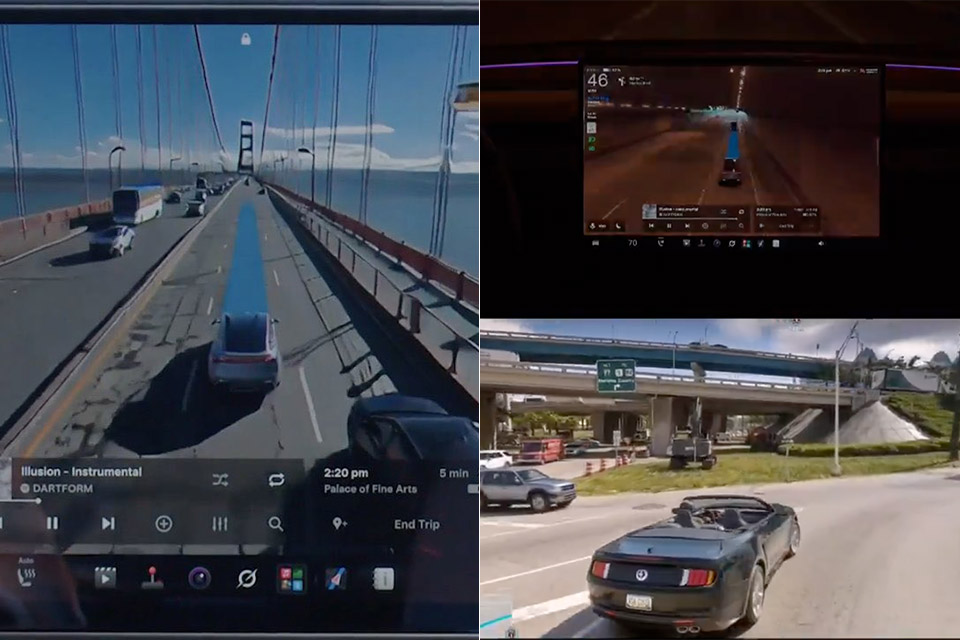
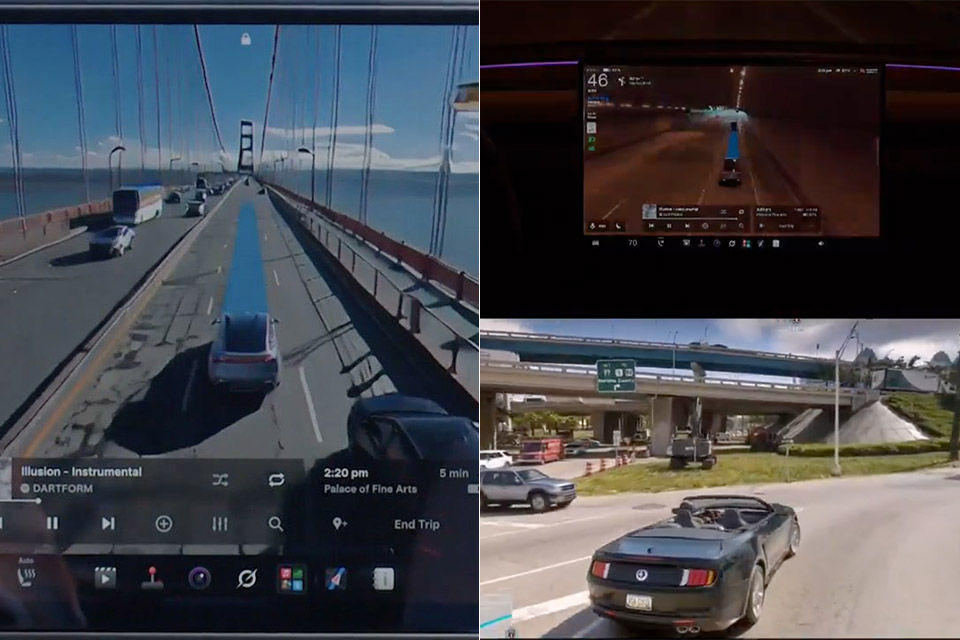
Tesla started pushing Full Self-Driving Supervised version 15 to early owners on November 21, and the screen that greets drivers once the update finishes looks nothing like the familiar gray blocks and simplified car shapes of older builds. Instead, a continuous overhead view rebuilds the street in front of the car with building windows, crosswalk stripes, parked vehicles, and pedestrians caught mid-step, all lit the way a night scene appears in a big open-world game. Elon Musk watched the same footage and posted a short reply that simply read “It’s like GTA,” a comparison that stuck because the rendered world moves with the car and shows the blue path the system intends to follow.
Reality View brings the outside world to life by creating the scene on screen using a virtual camera looking down at the car from above. Instead of using a pre-made graphics file, the neural engine that selects how to drive and at what speed draws that picture. As the product’s owner pointed out, this has the added benefit of requiring slightly less processing power than previously. Reality View can be displayed full screen, split so that the map takes up half the screen, or in a ‘quieter’ option to keep the journey more subdued. Coming up turns appear as little chevrons floating around in the view, and pressing on any location on the screen allows you to select a new destination or park in a specific spot, which is indicated with a small pin.
FSD v15 now starting to roll out – upgrading every part of the end-to-end driving network
Safety
25x better handling of safety critical casesTesla Reality View
Adds a live visualization of the drive that lets you see & control what FSD is planning to doNavigation for start & end of the trip now learns end-to-end from fleet route preferences. Later v15 releases will expand this to the entire route.
You also should notice better detection of signs, animals, debris, potholes and standing water, plus more natural speed handling in school zones and inclement weather.
Lastly, FSD can now slow for speed cameras & Bike Rack Mode lets you enable FSD w/ bike racks or similar hitch accessories
— Tesla (@Tesla) November 21, 2026
Then there are the behind-the-scenes updates. The latest software promises to operate 25 times more safely in emergency scenarios after the researchers retrained the visual recognizer on a vast collection of online movies and shared the update with the FSD, Robotaxi, and Optimus systems. The automobile can now pick up signs, small animals, and other objects with more ease, and it adjusts its speed considerably more smoothly in school zones and severe weather. It also now takes its favorite routes from the entire fleet, resulting in a significant portion of the route being updated in future updates, and even the suggestions for where to park are based on your own driving history and include possibilities displayed on the map.
FSD V15 nailed parking https://t.co/WnDOYiRY3H
— Sawyer Merritt (@SawyerMerritt) November 22, 2026
You can now avoid speed camera slowdowns by accelerating slightly, and the car will remember to ignore any camera locations you’ve highlighted. Bike Rack mode allows the FSD to function normally even when you have bike racks on the back, but you will still be stranded without reverse. The driver monitoring system also works better with hats and shades on, and it is less finicky when you drive quicker. Its turn signals are now soft, lasting only a few clicks before fading away.
Tesla Reality View Turns FSD v15 Trips Into Something That Looks Just Like GTA 6
#Tesla #Reality #View #Turns #FSD #v15 #Trips #GTA